The Roll20 Wizard Presents: Shortcuts and You!

Realm of Chaos has a magazine now! I don't know whether I should be excited or terrified at what articles will flood this place in the coming weeks. However, the magazine couldn't have come at a more opportune time, as I've had a brush with the supernatural.
I have been contacted by a ghost, one that resides within the virtual table top website Roll20. The mysterious specter refers to themselves as the "Roll20 Wizard" and seems to only be interested in sparing my life as long as I act as their avatar and impart their wisdom to you, our loyal readers. Seems simple enough, so what wisdom do they wish to bestow today?
Huh, keyboard shortcuts. I guess its a good idea to start with the basics and work our way up. Most of these will be more useful to fellow Game Masters, but some can improve quality of life for players as well.
Let's begin with some general shortcuts to make playing easier. If you want to quickly bring up the character sheet of any character you have access to, simply SHIFT + Double Click the token (You can also use ALT). This will open it up front and center, which stops you from searching through any menus and trying to find a sheet among hundreds of NPCs, and believe my experience when I say it saves hours over the course of a campaign. Keep in mind it won't open the sheet if it's already open somewhere on your screen, so watch out for any sneaky minimized windows.
Distance is often crucial in any TTRPG and measuring it is easy with the built in ruler tool. But what if you want to run around a corner or several? If you hit Q while using the ruler, you'll place a waypoint, allowing you to measure exactly how many grid tiles you move without ignoring the terrain you're in. If you press Q while moving a token, you instead place a waypoint for it. This will move the token along the path of waypoints you set for it, rather than phasing through the walls, and will also bring up the ruler for you so you can gauge distance on the fly.
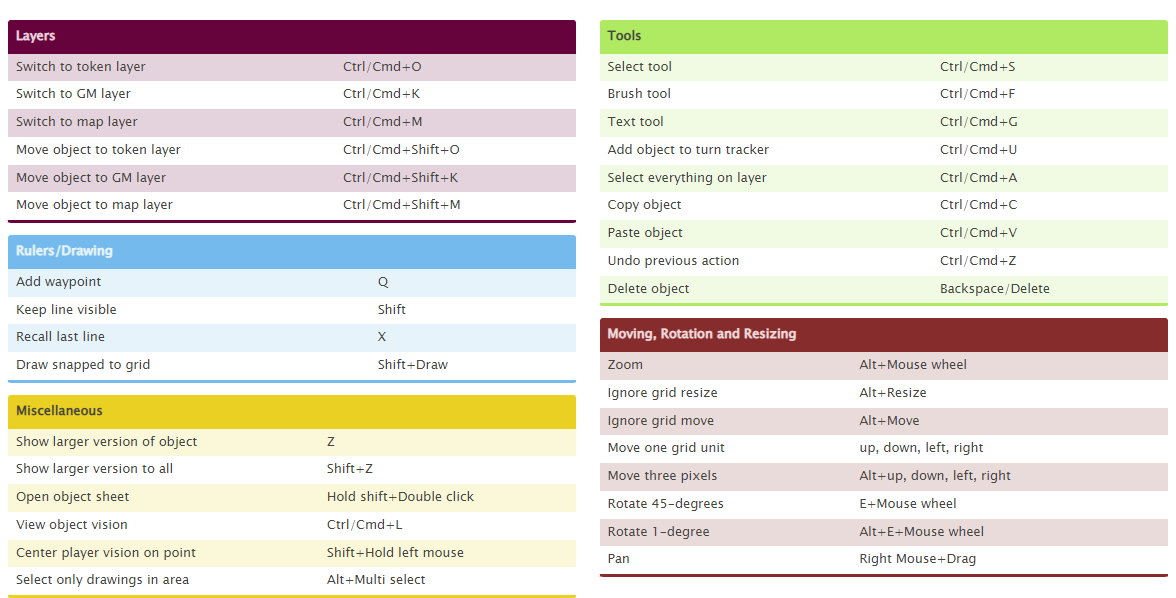
I could write about the various shortcuts for GMs to swap between layers with ease, or all the ways to fine tune the placement of tokens on the page, but instead the Wizard has graciously provided a handy reference guide for various useful shortcuts, which I have given you here;
Thanks Wizard, I'm glad I haven't been sacrificed to the RNG gods today! That's all the wisdom that has been given to me so far, tune in next time to take your tokens to the next level!
Comments ()